How to Connect AI Assistants to Internal Systems While Controlling Access and Actions
Connect AI to the systems your team already uses, with focused tools and people in control. A practical example from our portal shows how to start.
Start with the insights you need
What information does the AI need to access to give your team the insights they need? Start there. An invoice’s status, a project’s remaining hours, or your highest-spending customers are useful answers people can ask for while they work.
An MCP server connects compatible AI assistants to the systems that hold those answers. MCP, the Model Context Protocol, provides a standard interface for discovering and using tools. Your application’s permissions still decide which records each person can reach.
The first step is choosing a few questions worth answering. Identify where the information lives, who needs it, and whether the assistant will look up information or help someone make a change. That gives the engineering team a clear starting point.
Give AI a few focused tools
We design opinionated tools around business questions. For “Which customers are spending the most with us?”, one tool gathers and combines the relevant information, then returns the answer. The assistant can explain the result without piecing together every transaction itself.
When information lives in several systems, a unified interface brings it together for the MCP server. GraphQL is one way to build that layer. Existing software remains the source of the records; the assistant becomes another way to work with it.
- A person asks a question, and the assistant selects the appropriate tool.
- The server gathers the information the person is permitted to see.
- The assistant presents the result as a summary, chart, table, or agreed template.
A few well-documented tools help the AI reach the answer with fewer calls and less token usage. Caching information that rarely changes can reduce repeated requests to source systems. We pair the tools with skills: reusable instructions that guide the assistant’s tool use and presentation, with less back and forth for the person asking.
A practical example from our portal
At Buildable, we connected AI to our own portal. Our Ask your software story illustrates two useful interactions: getting an insight and preparing a time entry for review.
Ask for an insight
“Give me total hours by person on this project for the last two weeks.”
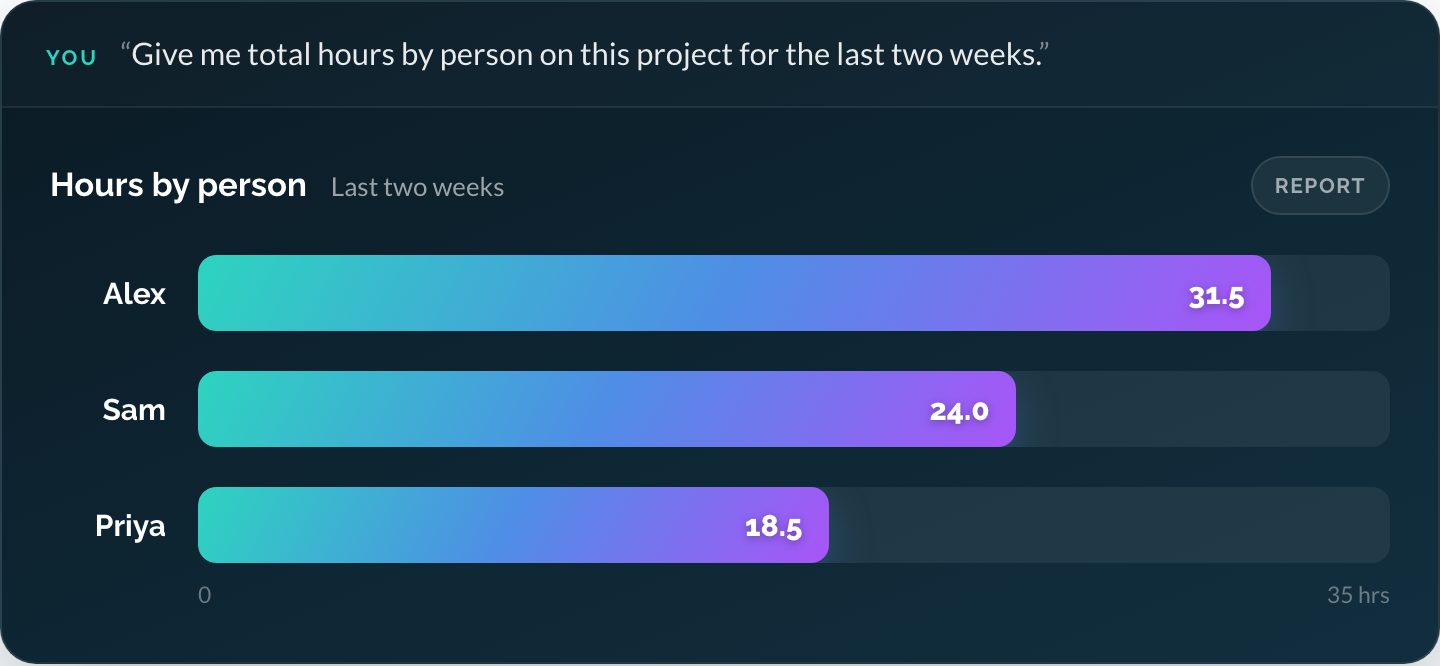
Our portal’s summary tool is defined to group visible timesheet hours by person, account, project, activity, or day. The server does the aggregation, giving the assistant a concise result to explain.
Prepare an action for approval
“Log three hours today on the membership portal project for onboarding calls.”
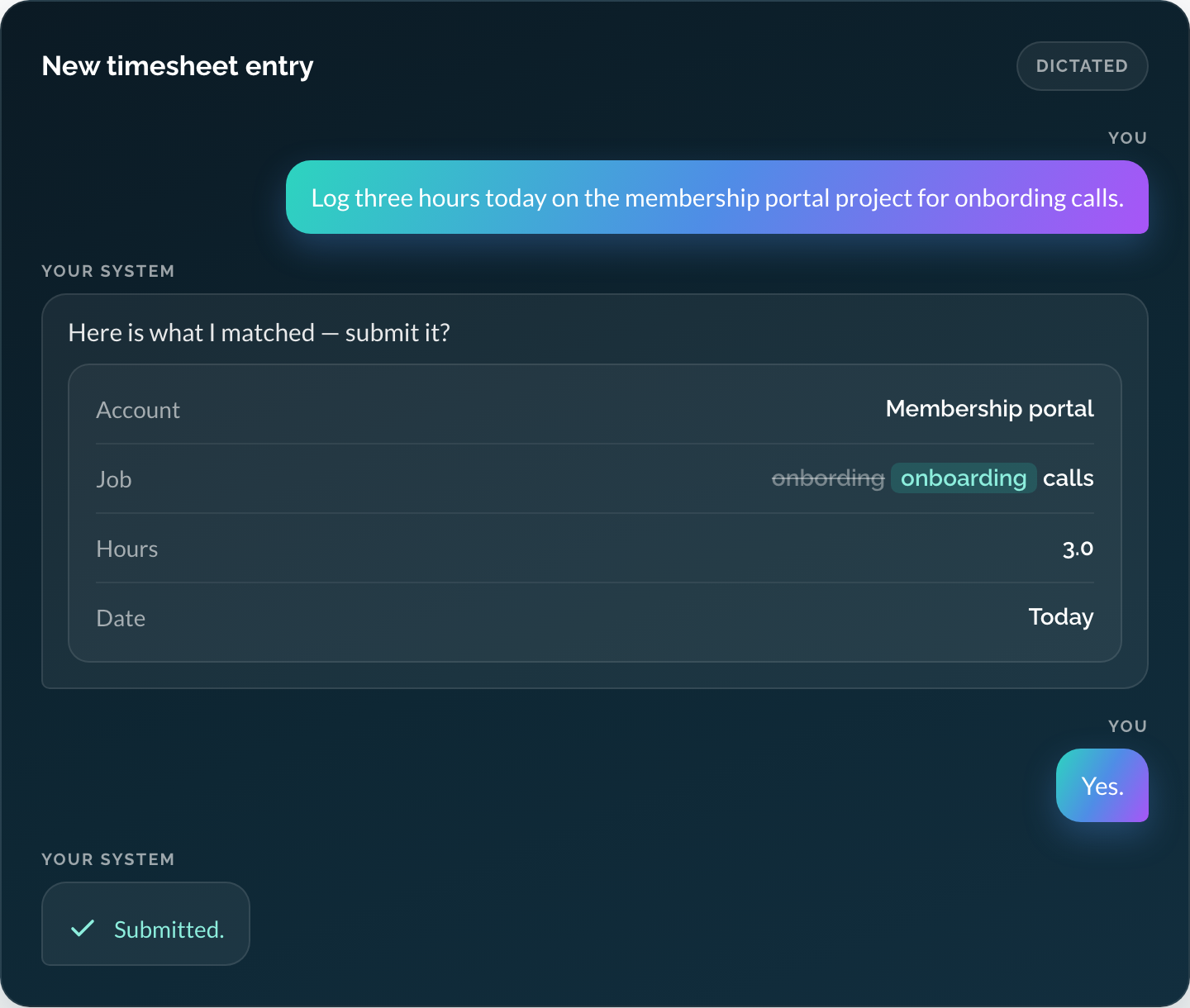
The portal’s time-entry interface is designed around prepare, review, and submit. Preparation validates the details without saving them and returns a review with a short-lived token. Submission is defined to require the person’s acceptance and values that match what they reviewed.
That describes the interface design. A pilot confirms its behavior in the deployment environment, including approval, cancellation, and the saved result.
Keep permissions and approvals in the application
Authentication confirms who someone is. Authorization determines what they can reach, like which keys to the building they hold. Engineers design both into the integration, with access checks enforced by the server and application.
Routine lookups can run within the user’s existing permissions. For the workflow described here, a person reviews and approves each change before it is saved. The application should check access again when the approved action runs and keep enough history to explain the outcome.
Decide where information will be processed as part of that design. A privately hosted MCP server can still return results to an external AI provider. Review what the tools return, the provider’s data-handling terms, and the deployment settings. The MCP security guidance provides technical detail for the engineering team.
Prove one useful workflow, then improve it
Start with a workflow your team knows well. During discovery, map the questions, systems, permissions, and expected answers. Check the interfaces available in older software too: APIs, database access, and vendor constraints shape the integration.
Build the first tools alongside evaluation tests using realistic questions with known answers. In the pilot, verify that:
- People receive accurate answers from records they are allowed to see.
- Changes require the intended approval, and cancellation leaves records unchanged.
- The saved result can be confirmed, including after an interrupted request.
Compare task completion, corrections, and elapsed time with the existing workflow. Deploy with real users, incorporate their feedback, and maintain the integration like other production software. Re-run the evaluation suite after tool changes and when adopting a new AI model, reviewing results in a testing dashboard.
Choose your first connection
A team with one system and engineers on staff can often extend it with guidance. When useful answers span several systems, Buildable designs, builds, and maintains the MCP server with you.
Buildable has built MCP servers for frontier model companies, and for our own portal.
For current pricing and delivery ranges, see our MCP server development and integration services. Bring the questions your team wants answered, the systems involved, and the people who will use it. We can work through the first connection together.

Phone: (503) 468-4880
Email: connect@buildableworks.com
What can we help you get done?
Have software that needs attention, a project that needs momentum, or a new idea to explore? Tell us where you need help.
This site is protected by reCAPTCHA. Google Privacy Policy and Terms of Service apply.




Copyright © 2026 Buildable.
All Rights Reserved
Privacy Policy | Terms of Service
Let's build what's next. Together.