What We Do

AI becomes more useful when it can access your data – with the right permissions.

For most organizations, the data AI needs already exists. It lives in project systems, document repositories, billing tools, CRMs, customer portals, databases, spreadsheets, support queues, internal APIs, and other systems their teams already rely on.

MCP servers make that data useful to AI in a safer, more structured way. They create a controlled layer between AI assistants and internal systems, so each assistant can access the right tools, the right data, and the right actions for its role while preserving existing user roles and permissions.

This gives teams a cleaner path for using AI across the business: one standard bridge between AI assistants and the specific systems they are approved to use.

At Buildable, we design, build, and deploy MCP servers for secure AI integrations, private business systems, workflow automation, and production-ready AI implementations. An MCP server can be used directly by an AI assistant during a natural chat conversation, or it can serve as a building block for AI tools such as Copilot, Claude, Codex, Cursor, and others.
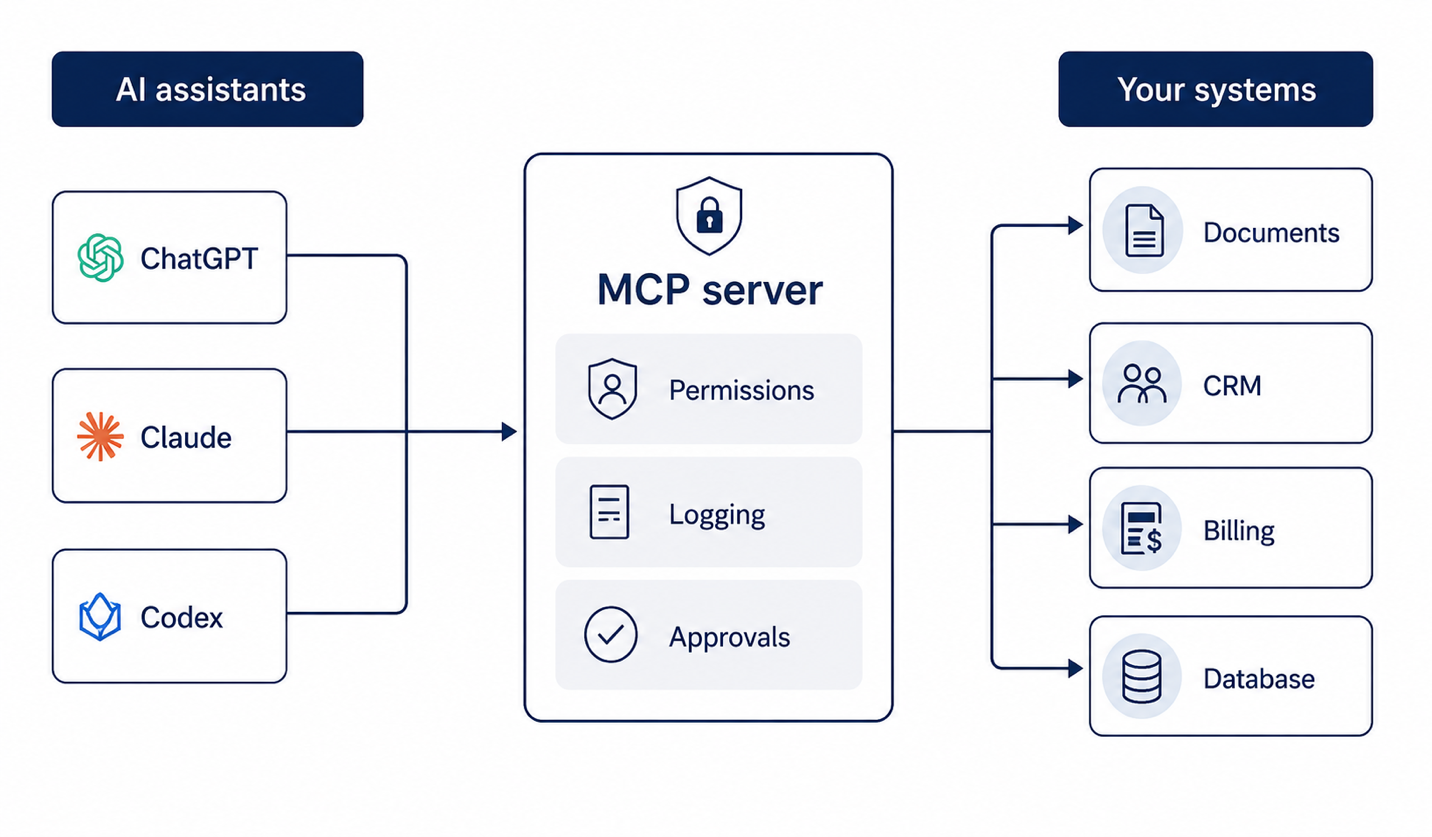
An MCP server gives AI assistants a secure, structured way to work with internal systems. It controls what the AI can access, what it can do, when human approval is needed, and how activity is logged.

AI assistants such as ChatGPT, Claude, and Codex connect through an MCP server — which enforces permissions, logging, and approvals — to your systems including documents, CRM, billing, and databases.
One standard bridge between AI assistants and the specific systems they are approved to use.
What It Does

What an MCP server can do

A well-designed MCP server gives AI assistants a controlled way to work with approved tools, data, and actions inside your organization. An MCP server can allow an assistant to:

  • Search approved documents
  • Query project records
  • Look up invoice status
  • Retrieve customer or account information
  • Summarize activity from internal systems
  • Draft responses from approved source data
  • Trigger workflow steps with human approval
  • Connect to private APIs in a way that can be reused across AI tools

MCP stands for Model Context Protocol. In practical terms, an MCP server defines what an AI assistant can access, what actions it can take, what information it should receive back, and what approvals or logs are required along the way.

Think of MCP as the approved interface between your business systems and the AI tools your team wants to use: specific tools, specific inputs, specific responses, and boundaries that match the workflow.

How It Works

Technical aspects of an MCP server

At a deeper level, an MCP server combines an AI-readable API with defined AI skills.

The API side

The API side handles system calls and authentication, and describes what tools are available, what information each tool needs, and what kind of response should come back. In that sense, it works a little like API documentation built for AI assistants.

The skills side

The skills side defines how the assistant should use those tools and present the results. A skill is a set of instructions, expected inputs, and response templates. For example, an invoice status skill may know what information to look up, which approved system to query, and how to return the answer in a useful format, such as a chart, table, summary, formatted HTML, or another presentation format.

Together, the API and the skills give AI assistants a structured way to understand what they can do, how to do it, and how to present useful results back to the user.

MCP vs. API Integration

MCP server vs. traditional API integration

Traditional API integrations usually define how one application communicates with another. MCP servers build on that idea for AI assistants.

An MCP server does more than connect systems. It describes what tools are available, what information each tool needs, what the assistant should receive back, and which actions require approval.

For teams used to traditional APIs, some of the ideas will feel familiar: tools behave a bit like endpoints, input schemas resemble API contracts, structured responses work like response models, and logs provide the audit trail. MCP adds an AI-facing layer on top of those concepts so assistants can understand when and how to use each capability.

That is why MCP implementation requires both software engineering and AI workflow design. The server needs to connect correctly to internal systems, and the tools need to behave in a way that supports real work.

A good MCP server gives AI clients:

  • Clear tool descriptions the assistant can understand
  • Defined inputs for each tool
  • Separation between read-only access and actions that change data
  • Approval steps for sensitive workflows
  • Structured responses the assistant can summarize or present
  • Activity logs for review and troubleshooting
  • Boundaries around the systems and records the assistant can reach
Private Deployment

Private MCP server deployment – the use case for most organizations

Many MCP servers are most useful when they can connect to private systems, such as internal applications, cloud environments, on-prem systems, developer machines, or services behind existing firewall rules.

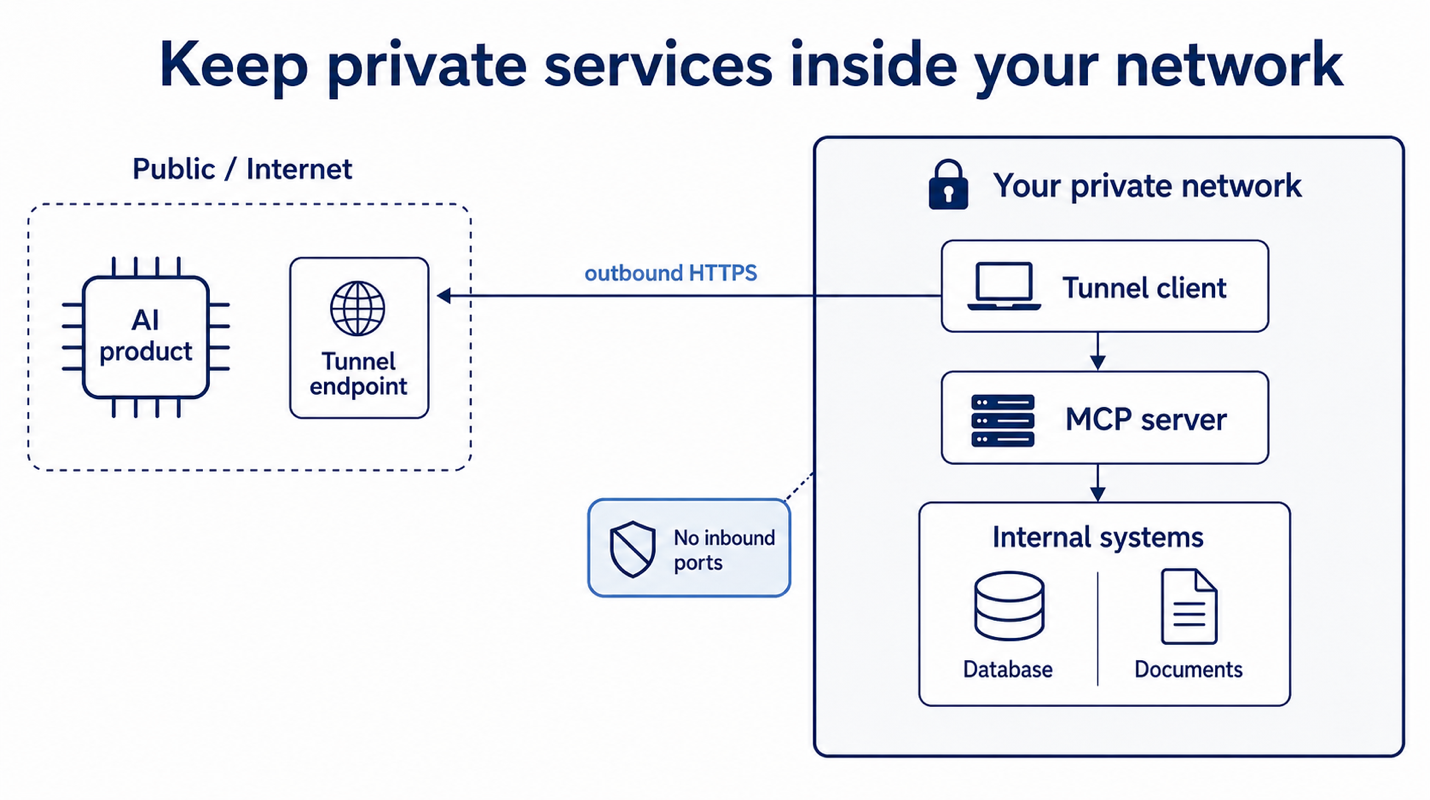
A private MCP deployment can use a secure outbound connection to make an approved MCP server available to supported AI tools while keeping the server inside existing network boundaries. This allows AI assistants to use approved tools and data while the MCP server remains private.

This gives organizations a practical way to deploy MCP servers while preserving the security controls that still matter: authentication, permissions, logging, data handling, approvals, and operational controls.

An AI product on the public internet reaches a tunnel client inside your private network over outbound HTTPS with no inbound ports; the tunnel client connects to the MCP server, which reaches internal systems such as a database and documents.
A secure outbound connection makes the MCP server available to supported AI tools while keeping it inside existing network boundaries.

How the frontier AI providers implement MCP

Each AI frontier provider implements MCP a little differently:

  • OpenAI supports private MCP connections through Secure MCP Tunnel and MCP access across supported OpenAI products such as ChatGPT, Codex, and the Responses API. View docs
  • Claude supports MCP through its MCP connector, remote MCP servers, and Claude Code integrations. View docs
  • Grok supports MCP through Remote MCP Tools and custom MCP server connections. View docs
  • Copilot supports MCP through Copilot Studio’s MCP onboarding flow and Power Apps custom connectors. View docs
  • Google Gemini supports MCP through Gemini CLI and Gemini Code Assist agent mode. View docs

Because MCP is supported across multiple AI platforms, a well-designed MCP server can become a reusable integration layer instead of a one-off connection to a single assistant.

Reusable Layer

How MCP creates a reusable AI integration layer

Reusable MCP integration layer

MCP gives your organization a standard way to connect approved AI assistants to internal tools and data. Once the right tools, permissions, and responses are exposed through an MCP server, that same layer can be reused across supported AI clients instead of rebuilding the same connection for each assistant.

Model-agnostic AI architecture

MCP helps separate your business systems from any single AI provider, model, or chat interface. The assistant your team uses today may not be the one you use next year, but the connection to your internal systems can remain consistent.

Use Cases

Example use cases

Instead of asking a generic assistant a generic question, your team asks against real business context. The value comes from connecting the assistant to the right systems, with the right limits, in the right workflow.

Internal document assistant

Connect an assistant to approved documents, contracts, policies, or procedures.

  • “Find the latest signed version of this agreement.”
  • “Summarize the policy that applies to this customer request.”

Project and account intelligence

Connect AI to project systems, client records, and delivery data.

  • “What changed on this account last week?”
  • “Summarize the current status before the client call.”

Billing and operations lookup

Connect AI to approved billing, invoice, and payment systems.

  • “Was this invoice paid?”
  • “What is outstanding for this customer?”

Customer support workflows

Connect AI to tickets, customer records, and internal knowledge.

  • “What related issues have we seen before?”
  • “Draft a response using approved documentation.”

Regulated workflow support

Connect AI to approved systems with careful permissions, logging, and review.

  • “Summarize this claim file.”
  • “Flag missing information before this moves to review.”

Developer and technical workflows

Connect AI coding tools to internal documentation, runbooks, and technical systems.

  • “Find the internal API documentation for this service.”
  • “Check which systems this change may affect.”
Where It Fits

Where MCP fits best

MCP is a strong fit when your team wants AI to work with systems that are:

  • Important to daily operations
  • Locked behind permissions
  • Spread across multiple tools
  • Hard for employees to search manually
  • Valuable enough to justify a durable integration layer
  • Sensitive enough to require logging, review, and access control
  • Likely to be used by more than one AI client or workflow over time

When a simpler move is better

MCP works best when the workflow is important enough to deserve a reusable, well-designed connection layer. For simpler needs, a focused API integration, automation, or data cleanup step may be the better first move.

Buildable helps you sort that out before building, so the implementation matches the workflow, the data, the permissions, and the long-term value of the use case.

Security & Governance

Secure AI workflow systems

Connecting AI to internal systems creates real value, especially when security and governance are built into the workflow from the start. Buildable designs MCP implementations around the controls that matter:

Access control

Which users can reach which tools, systems, records, or actions.

Tool boundaries

Which tools are read-only and which can create, update, send, delete, or trigger work.

Approval flows

Which actions can run directly and which require human review first.

Data review

What data is sent to the AI tool or MCP server, and how that data is handled.

Prompt injection protection

How the system handles untrusted content, tool outputs, or hidden instructions.

Logging and monitoring

What gets logged, who reviews it, and how exceptions are investigated.

Hosting model

Where the server runs, who operates it, what it can reach, and what data policies apply.

For sensitive workflows, we can limit exposed tools, use least-privilege access, validate authorization where OAuth is used, require approval before sensitive tool calls, and keep logs for review and troubleshooting. A secure MCP implementation is about the full workflow: the tools, the users, the permissions, the approvals, the data, and the environment where the server runs.

Connectors vs. Custom

MCP servers vs. built-in connectors and provider-hosted servers

Built-in connectors

Some AI platforms provide managed connectors for common tools such as Google Drive, Gmail, Google Calendar, Dropbox, SharePoint, Outlook, and Microsoft Teams. These are a good fit when the workflow is simple and the connector already supports the access, permissions, and actions the team needs.

Provider-hosted MCP servers

Some software providers offer official MCP servers for their own products. These can be useful when the provider’s server is trusted, supported, and aligned with your security requirements.

Custom MCP servers

Custom MCP servers are the right fit when the workflow is specific to your business: proprietary systems, internal databases, custom portals, legacy software, private APIs, or regulated workflows. This is where custom MCP server development matters.

Beyond Chat

Secure AI workflow experiences beyond chat

Many AI workflows start with a chat response, but some use cases are more useful when the result is presented as a structured workflow experience.

A well-designed MCP server can return structured data that supports review screens, tables, approvals, status views, side-by-side comparisons, and other application experiences when the AI client or application layer is designed for it.

This allows a first implementation to start as a secure assistant over one system, then expand into richer workflow support as the value becomes clear.

Examples include

  • Reviewing extracted document fields before approval
  • Showing open tasks in a work queue
  • Comparing records side by side
  • Routing a workflow to the right reviewer
How We Build

Custom MCP server development: how Buildable implements MCP servers

MCP is most useful when it is planned around the workflow it needs to support. Buildable plans, builds, and deploys MCP servers around real systems, real permissions, and real operational requirements.

  1. Planning and fit

    We map the workflow, users, systems, data sensitivity, and the outcome you want. We also confirm the right implementation path, whether that is an MCP server, a focused integration, or workflow automation.

  2. System and permission mapping

    We map the systems involved, such as databases, CRMs, internal APIs, and legacy systems; how to authenticate and connect to them; the people who need access; the actions they can take; the APIs we may need to build; and the boundaries to enforce.

  3. Tool design

    We define MCP tools around real user intent. Each tool should be specific enough to be safe and useful enough to support real work. Examples include searching approved documents, checking invoice status, listing open tasks, retrieving a customer record, drafting a response for review, or creating a workflow item after approval. A tool is essentially an endpoint the AI can call.

  4. Server build

    We build the MCP server, connect it to approved systems, define schemas, handle authentication, and structure responses for the AI clients that will use it. We typically build with TypeScript, Python, .NET/C#, Java/Kotlin, or Go MCP SDKs, depending on the technology stack that makes the most sense for your organization.

  5. Security and approval layer

    We implement user authentication, role-based access, least-privilege scopes, read/write boundaries, tool-level permissions, approval checkpoints, audit logging, monitoring, error handling, and rate limits. The goal is to make sure the assistant can only reach the tools, records, and actions the user is authorized to use.

  6. Deployment

    We deploy in the right environment: your cloud, your private infrastructure, near a legacy system, or behind a secure tunnel for private servers.

  7. Testing and iteration

    We test with real users, real prompts, and real records, then refine the tools, permissions, outputs, and review steps until the system is ready for production. Depending on scope, we often write an evaluation test suite and provide a testing dashboard to review results and continue improving the implementation.

Planning Ranges

Typical starting paths

We start with a focused scoping call, then provide a practical planning range before development begins. You start on one system, prove the value, and expand only when it earns the next step.

A typical path

  • Proof of concept, read-only against one system: about one to two weeks, starting at $8K.
  • Production read-only server, hardened and logged: about two to four weeks.
  • Multi-system workflow server, several systems and more actions: about four to eight weeks.
  • Read/write MCP server with approval flows for state-changing actions: six weeks and up.

Implementation estimates: simple, typical and advanced implementations.

MCP server timelines vary by scope, but most projects fall into three planning ranges. A proof of concept starts at $8K. Beyond that, pricing depends on the number of systems, permission requirements, deployment model, and whether the server is read-only or able to trigger actions. We scope the work first, then provide a clear planning range before development begins.

Implementation Best fit Typical timeframe Estimated effort Estimated cost
Simple MCP server A focused implementation with a small number of tools, one or two systems, straightforward permissions, and limited workflow complexity 2 to 3 weeks 60 - 120 hours $10,000 - $20,000
Typical MCP implementation A production-ready MCP server with multiple tools, user roles, structured responses, testing, and deployment into the right environment 4 to 6 weeks 160 - 240 hours $30,000 - $40,000
Advanced MCP implementation A more complex implementation involving multiple systems, deeper permission rules, approval workflows, write actions, evaluation testing, dashboards, and production hardening 8 to 12 weeks 320 - 480 hours $60,000 - $90,000

The tools themselves are often the most straightforward part of the implementation. The deeper work is planning the right use cases, writing evaluation tests around real scenarios, reviewing how the assistant uses the tools, and adjusting the tools and response formats until the results are reliable and useful. MCP implementation is a mix of art and science. The server needs to be technically correct, but it also needs to behave in a way that matches how people ask questions, review answers, and take action.

Why Buildable

Why Buildable

We build real software for operational, integration-heavy, and workflow-heavy environments, and MCP sits directly in that lane. This is software architecture, integration design, permissions, workflow logic, deployment, security, and long-term maintainability, not a bolt-on AI feature.

Without losing control of your systems

We help you connect AI to the systems you already use without losing control of them: clear enough for your business users and your security reviewers, useful enough for daily work, and durable enough for production.

How we build things matters

What if you could build the things that would make life better? Bring software applications to life in a way that solved your problems and empowered your organization? Our experienced engineers are people first, technologists second, and always brilliant. Simplify complexity, integrate systems, automate processes, and provide seamless user experiences with elegant, customized software solutions built to last.

Let's build something together Our approach

Who we are
Frequently Asked Questions

Frequently asked questions

What is an MCP server?

An MCP server is a structured integration layer that exposes approved tools, data sources, and workflows through the Model Context Protocol. It defines what the assistant can call, what inputs are required, what outputs come back, and what boundaries apply.

Why use MCP instead of a normal API integration?

A normal API integration connects one system to another. MCP is designed for AI assistants that need to discover tools, understand when to call them, pass structured inputs, receive structured outputs, and respect permission and approval boundaries.

Does MCP mean our data is public?

No. MCP does not require your internal systems or data to become public. Depending on the architecture, MCP servers can run inside private infrastructure, behind existing controls, or through secure connectivity patterns that preserve private network boundaries.

What is OpenAI's Secure MCP Tunnel?

It is one option for connecting private MCP servers to supported OpenAI products without opening inbound public ports. A customer-run client inside the private environment opens an outbound HTTPS path to OpenAI, forwards MCP requests to the local server, and returns responses through the same tunnel. It does not replace security review.

Does Secure MCP Tunnel replace security review?

No. It can reduce the networking burden for private MCP integrations, but teams still need to review authentication, permissions, logging, data handling, tool behavior, approval flows, and operational controls.

Can MCP work with ChatGPT and Claude?

Yes, when the specific client or product surface supports MCP and the required auth and deployment pattern. MCP is supported across major AI and developer tools, including ChatGPT, Claude, Gemini, Cursor, Microsoft Copilot, and Visual Studio Code, with implementation details varying by platform.

Can an MCP server take actions, or is it read-only?

Either, depending on how it is designed. Many first implementations start read-only. Write actions, external sends, deletes, and workflow changes should be handled with explicit permissions and human review.

What systems can MCP connect to?

Documents, databases, internal tools, CRMs, billing systems, project platforms, customer portals, private APIs, cloud services, and custom software. The right architecture depends on the workflow, the sensitivity of the data, and your operational requirements.

How long does an MCP project take?

A focused proof of concept can often be scoped around one workflow and one or two systems. Production timelines depend on the number of systems, permission requirements, deployment environment, audit needs, and whether the server must run inside private infrastructure or support state-changing actions.

What is the best first MCP use case?

Usually a high-friction lookup or workflow where the data exists, the permissions are clear, and the result is easy to verify. Examples include document search, invoice lookup, project status, customer summaries, and support knowledge assistants.

Does Buildable build MCP servers for private systems?

Yes. Buildable builds custom MCP servers for private APIs, databases, internal tools, legacy systems, document repositories, CRMs, billing systems, and workflow platforms. We design the server around the workflow, permission model, deployment environment, and security review the organization needs.

When should we build a custom MCP server instead of using a built-in connector?

Use a built-in connector when the workflow is simple and the platform already covers the data and actions you need. Build a custom MCP server when the workflow depends on proprietary systems, internal databases, custom portals, regulated processes, private APIs, or permissions that a generic connector cannot represent.

Can Buildable help with secure AI integrations beyond MCP?

Yes. MCP is one pattern for secure AI integration. Buildable also builds custom software, workflow systems, internal tools, automation layers, API integrations, and production-ready AI implementation when MCP is not the right architecture.

Buildable's Logo 1-Color

What can we help you with?

Talk with an expert at Buildable about your project.


This site is protected by reCAPTCHA. Google Privacy Policy and Terms of Service apply.

Copyright © 2026 Buildable.
All Rights Reserved
Privacy Policy | Terms of Service

Let's build what's next. Together.

Web Design and Web Development by Buildable